

✅ 目标:抓取一个网页中的“常见资源”(图片、CSS、JS、链接)按照链接自动创建文件,自动过滤已经存在的资源文件避免重复下载
我们将使用:
requests:发送 HTTP 请求BeautifulSoup4:解析 HTMLurllib.parse:处理 URL
安装依赖
pip install requests beautifulsoup4示例代码:抓取网页资源
import requests
from bs4 import BeautifulSoup
from urllib.parse import urljoin, urlparse
import os
import time
import re

# ==================== 配置区 ====================
BASE_URL = "https://xxx.cc/about-us/"  # 替换为目标网站
OUTPUT_DIR = "downloaded"               # 根下载目录

HEADERS = {
    "User-Agent": "Mozilla/5.0 (Windows NT 10.0; Win64; x64) AppleWebKit/537.36 (KHTML, like Gecko) Chrome/120.0.0.0 Safari/537.36"
}

TIMEOUT = 10
DELAY = 1  # 请求间隔,避免太快
# ================================================

def sanitize_path(path):
    """清理路径中的非法字符"""
    return re.sub(r'[<>:"|?*\x00-\x1F]', '_', path)

def create_dir_for_file(filepath):
    """根据文件路径创建目录"""
    dir_name = os.path.dirname(filepath)
    if dir_name and not os.path.exists(dir_name):
        os.makedirs(dir_name, exist_ok=True)

def download_file_with_path(url, root_dir):
    """
    根据 URL 路径结构下载文件
    例如: https://example.com/static/css/style.css
    保存为: root_dir/static/css/style.css
    """
    try:
        response = requests.get(url, headers=HEADERS, timeout=TIMEOUT, stream=True)
        response.raise_for_status()

        # 解析 URL
        parsed_url = urlparse(url)
        # 获取路径部分(如 /static/css/style.css)
        url_path = parsed_url.path

        # 如果路径为空或以 / 结尾,视为索引页
        if not url_path or url_path.endswith('/'):
            # 推测文件类型
            content_type = response.headers.get('Content-Type', '').lower()
            if 'text/css' in content_type:
                ext = '.css'
            elif 'application/javascript' in content_type or 'text/javascript' in content_type:
                ext = '.js'
            elif 'image/' in content_type:
                if 'jpeg' in content_type:
                    ext = '.jpg'
                elif 'png' in content_type:
                    ext = '.png'
                elif 'gif' in content_type:
                    ext = '.gif'
                else:
                    ext = '.img'
            else:
                ext = '.html'
            filename = f"index{ext}"
        else:
            # 使用 URL 中的真实文件名
            filename = os.path.basename(url_path)

        # 清理文件名
        filename = sanitize_path(filename)
        if '.' not in filename:
            filename += '.dat'  # 默认扩展名

        # 构建本地路径:root_dir + url_path
        local_path = os.path.join(root_dir, url_path.lstrip('/'))
        # 如果是目录,确保以 / 结尾,补 index.html
        if local_path.endswith('/'):
            local_path += 'index.html'
        # 插入文件名(替换最后一个部分)
        local_dir = os.path.dirname(local_path)
        local_filepath = os.path.join(local_dir, filename)

        # 创建目录
        create_dir_for_file(local_filepath)

        # 检查是否已存在
        if os.path.exists(local_filepath):
            print(f" 已存在,跳过: {filename}")
            return local_filepath

        # 开始下载
        with open(local_filepath, 'wb') as f:
            for chunk in response.iter_content(chunk_size=8192):
                f.write(chunk)
        print(f"下载成功: {local_filepath}")
        return local_filepath

    except Exception as e:
        print(f"❌ 下载失败: {url} | 错误: {e}")
        return None

def fetch_and_download_with_structure(url):
    """抓取资源并按原始路径结构下载"""
    try:
        response = requests.get(url, headers=HEADERS, timeout=TIMEOUT)
        response.raise_for_status()
    except requests.RequestException as e:
        print(f"❌ 请求失败: {e}")
        return

    soup = BeautifulSoup(response.text, 'html.parser')
    base_netloc = urlparse(url).netloc  # 用于过滤同域资源

    resources = []

    # 收集所有资源(img, link, script)
    for tag in soup.find_all(['img', 'link', 'script']):
        src = None
        if tag.name == 'img' and tag.get('src'):
            src = tag['src']
        elif tag.name == 'link' and tag.get('href'):
            src = tag['href']
        elif tag.name == 'script' and tag.get('src'):
            src = tag['src']

        if src:
            abs_url = urljoin(url, src)
            # 只下载同域资源(可选)
            if urlparse(abs_url).netloc == base_netloc:
                resources.append(abs_url)

    print(f" 发现 {len(resources)} 个同域资源")

    # 创建根目录
    if not os.path.exists(OUTPUT_DIR):
        os.makedirs(OUTPUT_DIR)
        print(f" 创建根目录: {OUTPUT_DIR}")

    downloaded_count = 0

    for res_url in resources:
        print(f"   {res_url}")
        result = download_file_with_path(res_url, OUTPUT_DIR)
        if result:
            downloaded_count += 1
        time.sleep(DELAY)

    print(f"\n 抓取完成!共下载 {downloaded_count} 个资源")
    print(f" 保存路径: ./{OUTPUT_DIR}/")
    print(f"原始结构已保留,可直接用浏览器打开查看")

# ============ 执行 ============
if __name__ == "__main__":
    print(f" 开始抓取并按路径下载资源: {BASE_URL}")
fetch_and_download_with_structure(BASE_URL)下载的资源按照原始链接的路径结构创建文件夹,这样能更好地保留网站的原始目录结构(例如 /static/css/style.css 就保存为 downloaded/static/css/style.css)。
将资源下载到本地时,保持原始 URL 的路径层级,例如:
https://example.com/static/js/app.js        → ./downloaded/static/js/app.js
https://example.com/images/logo.png        → ./downloaded/images/logo.png
https://example.com/assets/css/main.css    → ./downloaded/assets/css/main.css
下载后的目录结构示例
假设网站结构:
https://example.com/
├── static/css/style.css
├── static/js/app.js
├── images/logo.png
└── assets/docs/report.pdfdownloaded/
├── static/
│ ├── css/
│ │ └── style.css
│ └── js/
│ └── app.js
├── images/
│ └── logo.png
└── assets/
└── docs/
└── report.pdf注意事项
路径过长:Windows 有路径长度限制(260字符),极端情况需处理。
非法字符:已用 sanitize_path 过滤 < > : " | ? * 等。
同名目录/文件:已处理,如 /about/ → /about/index.html
跨域资源:当前只下载同域资源,避免下载 CDN 或第三方内容(可修改逻辑放开)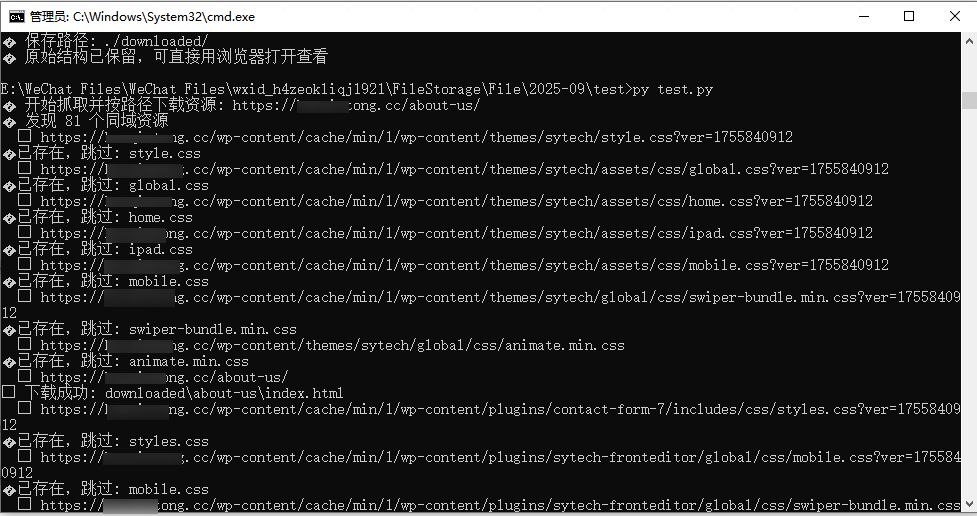
下载附件:https://www.zmmz.com/uploads/20250917/test.py_dRbce4.zip