
小程序和uniapp加自定义头部返回按钮及回到首页样式
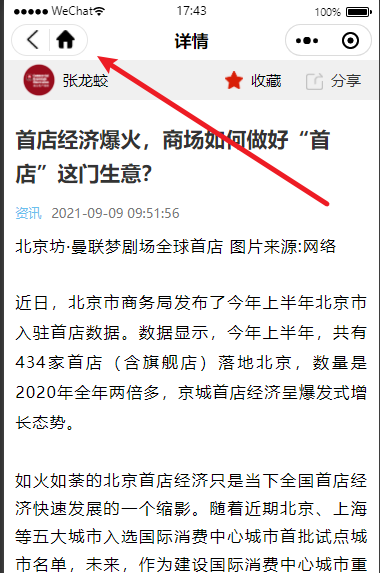
看图:
小程序做法:
配置:
思路

实现
this.globalData.headerBtnPosi = wx.getMenuButtonBoundingClientRect()复制代码
wx.getSystemInfo({ // iphonex底部适配
success: res => {
that.globalData.systeminfo = res
}
})

headerPosi:{
	bottom: 82
	height: 32
	left: 278
	right: 365
	top: 50
	width: 87
}
<view class="custom_nav" style="height:{{navbarHeight}}px;">
  <view class="custom_nav_box" style="height:{{navbarHeight}}px;">
    <view class="custom_nav_bar" style="top:{{statusBarHeight}}px; height:{{cusnavH}}px;">
      <view class="custom_nav_icon"  wx:if="{{!navbarData.has_search}}" style="height:{{navbarBtn.height - 2}}px; top:{{navbarBtn.top}}px; left:{{navbarBtn.right}}px; border-radius: {{navbarBtn.height / 2}}px">
        <view class="gobank" style="height:{{navbarBtn.height - 10}}px;width:{{navbarBtn.height - 10}}px;"></view>
        <view class="home" style="height:{{navbarBtn.height -10 }}px;width:{{navbarBtn.height - 10}}px;"></view>
      </view>
      <view class="nav_title" wx:if="{{!navbarData.has_search}}" style="height:{{cusnavH}}px; line-height:{{cusnavH}}px;">组件目录</view>
    </view>
  </view>
</view>
复制代码
wxss部分
.custom_nav {
  width: 100%;
  background: #fff;
}
.custom_nav_box {
  position: fixed;
  width: 100%;
  background: #fff;
}
.custom_nav_bar{
  position: relative;
}
.custom_nav_box .nav_title {
  font-size: 34rpx;
  color: #000;
  text-align: center;
  position: absolute;
  max-width: 360rpx;
  overflow: hidden;
  text-overflow: ellipsis;
  white-space: nowrap;
  top: 0;
  left: 0;
  right: 0;
  bottom: 0;
  margin: auto;
  font-weight: 600;
}
.custom_nav_box .custom_nav_icon {
  position: absolute;
  border: .5rpx solid rgba(0, 0, 0, .1);
  border-radius: 50%;
  display: flex;
  padding: 0 10rpx
}
.custom_nav_icon .gobank {
  background: url('https://www.easyicon.net/api/resizeApi.php?id=1225467&size=128') no-repeat center center;
  background-size: 60%;
  padding:0 5px;
  margin: 4px 0;
}
.custom_nav_icon .home {
  background: url('https://www.easyicon.net/api/resizeApi.php?id=1223065&size=128') no-repeat center center;
  background-size: 60%;
  padding:0 5px;
  margin: 4px 0;
  border-left: 1px solid rgba(0, 0, 0, .1)
}
复制代码
js部分
conts app = getArr();
Component({
  properties: {
    navbarData: { // navbarData 由父页面传递的数据
      type: Object,
      value: {
        gobank: true,
        gohome: true,
        has_search: false,
      },
      observer: function (newVal, oldVal) {
      }
    }
  },
  data: {
    haveBack: true, // 是否有返回按钮,true 有 false 没有 若从分享页进入则没有返回按钮
    statusBarHeight: 0, // 状态栏高度
    navbarHeight: 0, // 顶部导航栏高度
    navbarBtn: { // 胶囊位置信息
      height: 0,
      width: 0,
      top: 0,
      bottom: 0,
      right: 0
    },
    cusnavH: 0,
    searchW: 0, //搜索框宽度
  },
  // 微信7.0.0支持wx.getMenuButtonBoundingClientRect()获得胶囊按钮高度
  attached: function () {
    let statusBarHeight = app.globalData.systeminfo.statusBarHeight // 状态栏高度
    let headerPosi = app.globalData.headerBtnPosi // 胶囊位置信息
    console.log(statusBarHeight)
    console.log(headerPosi)
    let btnPosi = { // 胶囊实际位置,坐标信息不是左上角原点
      height: headerPosi.height,
      width: headerPosi.width,
      top: headerPosi.top - statusBarHeight, // 胶囊top - 状态栏高度
      bottom: headerPosi.bottom - headerPosi.height - statusBarHeight, // 胶囊bottom - 胶囊height - 状态栏height (胶囊实际bottom 为距离导航栏底部的长度)
      right: app.globalData.systeminfo.screenWidth - headerPosi.right // 屏幕宽度 - 胶囊right
    }
    let haveBack;
    if (getCurrentPages().length === 1) { // 当只有一个页面时,并且是从分享页进入
      haveBack = false;
    } else {
      haveBack = true;
    }
    var cusnavH = btnPosi.height + btnPosi.top + btnPosi.bottom // 导航高度
    var searchW = app.globalData.systeminfo.screenWidth - headerPosi.width - btnPosi.right * 2 - 30
    console.log(searchW, app.globalData.systeminfo.screenWidth, headerPosi.width)
    this.setData({
      haveBack: haveBack, // 获取是否是通过分享进入的小程序
      statusBarHeight: statusBarHeight,
      navbarHeight: headerPosi.bottom + btnPosi.bottom, // 胶囊bottom + 胶囊实际bottom
      navbarBtn: btnPosi,
      cusnavH: cusnavH,
      searchW: searchW
    })
  },
  methods: {
    _goBack: function () {
      wx.navigateBack({
        delta: 1
      });
    },
    _goHome: function () {
      wx.navigateTo({
        url: '/pages/index/index',
      });
    }
  }
})
uniapp做法:
以组件的方式使用
创建一个capsule.vue
代码如下:
<template>
	<view>
		<view class="custom_nav" :style="{height:navbarHeight+'px;background: #FFFFFF; position: relative;z-index: 99999999;'}">
		  <view class="custom_nav_box" :style="{height:navbarHeight+'px'}">
			<view class="custom_nav_bar" :style="{top:statusBarHeight+'px',height:cusnavH+'px'}">
			  <view class="custom_nav_icon"  v-if="!navbarData.has_search" :style="{height:navbarBtn.height - 2+'px',top:navbarBtn.top+'px',left:navbarBtn.right+'px',borderRadius:navbarBtn.height / 2+'px'}">
				<view class="gobank" @click="_goBack" :style="{height:navbarBtn.height - 10+'px',width:navbarBtn.height - 10+'px'}"></view>
				<view class="home" @click="_goHome" :style="{height:navbarBtn.height -10+'px',width:navbarBtn.height - 10+'px'}"></view>
			  </view>
			  <view class="nav_title" v-if="!navbarData.has_search" :style="{height:cusnavH+'px',lineHeight:cusnavH+'px'}">详情</view>
			</view>
		  </view>
		</view>
	</view>
</template>

<script>
	export default {
		name:"capsule",
		data() {
			return {
				 haveBack: true, // 是否有返回按钮,true 有 false 没有 若从分享页进入则没有返回按钮
				statusBarHeight: 0, // 状态栏高度
				navbarHeight: 0, // 顶部导航栏高度
				navbarBtn: { // 胶囊位置信息
				  height: 0,
				  width: 0,
				  top: 0,
				  bottom: 0,
				  right: 0
				},
				cusnavH: 0,
				searchW: 0, //搜索框宽度
			};
		},
		mounted(){
			const systeminfo = wx.getSystemInfoSync();
		    let statusBarHeight =systeminfo.statusBarHeight // 状态栏高度
			 const headerPosi = wx.getMenuButtonBoundingClientRect();
		     console.log(statusBarHeight)
		     console.log(headerPosi)

		     let btnPosi = { // 胶囊实际位置,坐标信息不是左上角原点
		       height: headerPosi.height,
		       width: headerPosi.width,
		       top: headerPosi.top - statusBarHeight, // 胶囊top - 状态栏高度
		       bottom: headerPosi.bottom - headerPosi.height - statusBarHeight, // 胶囊bottom - 胶囊height - 状态栏height (胶囊实际bottom 为距离导航栏底部的长度)
		       right: systeminfo.screenWidth - headerPosi.right // 屏幕宽度 - 胶囊right
		     }

		     let haveBack;
		     if (getCurrentPages().length === 1) { // 当只有一个页面时,并且是从分享页进入
		       haveBack = false;
		     } else {
		       haveBack = true;
		     }
		     var cusnavH = btnPosi.height + btnPosi.top + btnPosi.bottom // 导航高度
		     var searchW = systeminfo.screenWidth - headerPosi.width - btnPosi.right * 2 - 30

		     // console.log(searchW, app.globalData.systeminfo.screenWidth, headerPosi.width)
		       this.haveBack= haveBack; // 获取是否是通过分享进入的小程序
		       this.statusBarHeight= statusBarHeight;
		       this.navbarHeight= headerPosi.bottom + btnPosi.bottom; // 胶囊bottom + 胶囊实际bottom
		       this.navbarBtn= btnPosi;
		       this.cusnavH= cusnavH;
		       this.searchW= searchW;
		},
		methods:{
			_goBack: function () {
			      uni.navigateBack({
			        delta: 1,
					fail(){
						uni.switchTab({
						  url: '/pages/index/index',
						});
					}
			      });
			    },
			    _goHome: function () {
			      uni.switchTab({
			        url: '/pages/index/index',
			      });
			    }
		}
	}
</script>

<style>
.custom_nav {
  width: 100%;
  background: #fff;
}

.custom_nav_box {
  position: fixed;
  width: 100%;
  background: #fff;
}
.custom_nav_bar{
  position: relative;
}
.custom_nav_box .nav_title {
  font-size: 34rpx;
  color: #000;
  text-align: center;
  position: absolute;
  max-width: 360rpx;
  overflow: hidden;
  text-overflow: ellipsis;
  white-space: nowrap;
  top: 0;
  left: 0;
  right: 0;
  bottom: 0;
  margin: auto;
  font-weight: 600;
}

.custom_nav_box .custom_nav_icon {
  position: absolute;
  border: .5rpx solid rgba(0, 0, 0, .1);
  border-radius: 50%;
  display: flex;
  padding: 0 10rpx
}
.custom_nav_icon .gobank {
  background: url('/static/images/nav_back.png') no-repeat center center;
  background-size: 60%;
  padding:0 5px;
  margin: 4px 0;
}
.custom_nav_icon .home {
  background: url('/static/images/9ef6a7663a54da950bea777d0562642.png') no-repeat center center;
  background-size: 60%;
  padding:0 5px;
  margin: 4px 0;
  border-left: 1px solid rgba(0, 0, 0, .1)
}
</style>
import capsule from '@/components/capsule/capsule.vue';
在components里写入
components: {
	capsule
},